





Flexo Ink Drying Problems: Causes and Machine Solutions
Why Flexo Ink Drying Problems Should Not Be Treated as an Ink-Only Issue
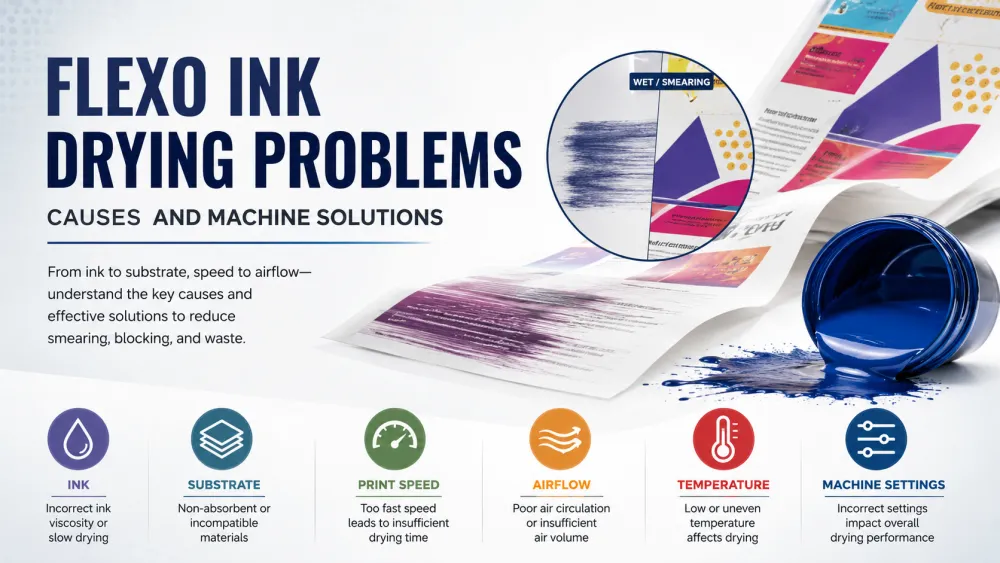
When flexographic ink does not dry properly, operators often assume that the ink formulation is the only cause. They may add more solvent, reduce viscosity, increase temperature, or replace the ink entirely. However, many flexo ink drying problems are caused by an interaction between the ink, substrate, anilox roller, printing speed, drying system, tension control, and production environment.
This is why the same ink may perform well on one flexo printing machine but produce smearing, blocking, poor adhesion, or residual solvent on another press.
A reliable troubleshooting process should therefore examine the complete production system:
- Ink formulation and viscosity.
- Substrate surface properties.
- Ink film thickness.
- Printing speed.
- Drying temperature and airflow.
- Exhaust efficiency.
- Web tension and cooling.
- Machine configuration.
Identifying the real cause before changing production parameters helps reduce material waste, protect print quality, and avoid unnecessary machine downtime.
Common Flexo Ink Drying Problems and Their Machine Solutions
Flexo ink drying defects can appear in different forms. The visible symptom provides an important starting point, but the operator should still check multiple possible causes before making adjustments.
| Drying Problem | Possible Cause | Recommended Machine Solution |
|---|---|---|
| Ink smearing after printing | Insufficient drying time, weak airflow, or excessive ink deposit | Improve hot-air circulation, reduce anilox ink volume, or lower printing speed temporarily |
| Blocking inside the finished roll | Ink surface appears dry but remains soft underneath | Increase effective drying and exhaust, improve web cooling, and reduce rewinding pressure |
| Ink transfers to the reverse side | Web enters the rewinding unit before sufficient drying or cooling | Extend drying time, improve cooling, and check winding tension |
| Poor ink adhesion | Low substrate surface energy, incompatible ink, or incomplete drying | Check corona treatment, substrate quality, ink compatibility, and dryer balance |
| Slow drying at higher speed | Drying capacity does not match the production speed | Increase airflow and exhaust capacity or use a drying system designed for higher-speed production |
| Residual solvent odor | Poor solvent evaporation or insufficient exhaust | Improve exhaust efficiency, control ink film thickness, and verify dryer temperature distribution |
| Color contamination between stations | Previous color is not dry before the next printing unit | Optimize inter-color drying and reduce excessive ink transfer |
| Substrate deformation or shrinkage | Dryer temperature is too high or uneven | Reduce temperature, increase airflow efficiency, and improve web tension control |
What Causes Flexo Ink to Dry Too Slowly?
Slow drying is rarely caused by one isolated factor. It is usually the result of several production conditions occurring at the same time.
1. The Drying System Does Not Match the Printing Speed
A flexo press may operate mechanically at a higher speed, but this does not mean the ink can dry at the same rate. When the web moves faster, the available drying time between printing stations and before rewinding becomes shorter.
A higher-speed press requires sufficient:
- Hot-air volume.
- Air velocity.
- Heating capacity.
- Exhaust capacity.
- Inter-color drying efficiency.
- Final drying length.
Simply increasing the dryer temperature may not solve the problem. Effective drying depends on removing the solvent or water vapor from the ink surface, which requires both controlled heat and adequate air exchange.
2. Airflow Is Weak or Uneven
Even when the displayed dryer temperature appears correct, poor airflow can prevent efficient evaporation. Blocked air channels, dirty filters, damaged fans, incorrectly positioned nozzles, or weak exhaust can create uneven drying across the web.
Typical signs of airflow problems include:
- One side of the printed web dries better than the other.
- The center of the web remains tacky.
- Drying performance changes between colors.
- Operators must use unusually high temperatures.
Regular inspection of fans, filters, air knives, ducting, and exhaust systems should be part of preventive maintenance.
3. The Ink Film Is Too Thick
A larger anilox cell volume transfers more ink to the printing plate and substrate. Although this may increase color density, it also creates a thicker ink film that requires more energy and time to dry.
If the anilox roller supplies more ink than the design requires, operators may experience:
- Slow drying.
- Dirty printing.
- Ink buildup.
- Blocking.
- Higher solvent consumption.
Selecting an anilox specification according to the artwork, ink system, substrate, and target color density is more effective than relying on maximum ink transfer.
4. Ink Viscosity Is Incorrect
Ink viscosity affects transfer, leveling, color strength, and drying behavior. Ink that is too viscous may create an unnecessarily thick deposit, while ink that is excessively diluted can affect print density, trapping, and adhesion.
Viscosity should be controlled consistently throughout the production run rather than adjusted only when a visible defect appears. An automatic viscosity control system can reduce variation during long runs.
5. The Ink Is Not Suitable for the Substrate
Paper, PE, BOPP, PET, CPP, and laminated packaging structures have different surface properties and drying requirements. An ink designed for an absorbent paper substrate may not perform correctly on a non-porous plastic film.
The ink supplier should confirm compatibility with:
- The exact substrate.
- Surface treatment level.
- Printing speed.
- End-use requirements.
- Lamination process.
- Food packaging requirements, where applicable.
6. The Substrate Has Insufficient Surface Treatment
Plastic films normally require adequate surface energy for reliable ink wetting and adhesion. If the corona treatment level is too low or has decreased during storage, the ink may remain on the surface without forming a stable bond.
This problem can be mistaken for incomplete drying because the ink may wipe off or transfer easily even after passing through the dryer.
Operators should check the actual dyne level before production and confirm that the treatment is suitable for the selected ink and substrate.
7. Exhaust Efficiency Is Too Low
A dryer must not only supply heat; it must also remove moisture or solvent-loaded air. When exhaust efficiency is insufficient, saturated air remains inside the drying chamber and reduces evaporation.
Poor exhaust may lead to:
- Residual odor.
- Slow drying.
- Solvent accumulation.
- Unstable dryer performance.
- Increased safety risks when solvent-based inks are used.
Drying and exhaust should be designed as one coordinated system rather than treated as separate machine functions.
8. Temperature and Humidity Are Not Controlled
The production environment can have a noticeable influence on ink behavior. High humidity can slow the drying of some water-based ink systems, while excessive ambient temperature may cause ink to dry too quickly on the plate or anilox roller.
Seasonal changes may explain why a previously stable production job suddenly develops drying problems even when the same machine, ink, and substrate are used.
How Different Packaging Materials Affect Ink Drying
The substrate is one of the most important factors in flexo ink drying. Absorbent materials allow part of the ink vehicle to penetrate the surface, while non-porous films depend mainly on evaporation and surface adhesion.
| Material | Typical Drying Difficulty | Main Considerations |
|---|---|---|
| Paper | Low to Medium | Absorbency supports drying, but excessive ink can cause penetration, distortion, or color variation |
| Coated Paper | Medium | Lower absorbency means dryer settings and ink film thickness require closer control |
| PE Film | High | Non-porous and heat-sensitive; requires suitable ink, surface treatment, controlled temperature, and effective airflow |
| BOPP Film | High | Requires adequate surface energy, suitable ink chemistry, and stable tension at production speed |
| PET Film | Medium to High | Good dimensional stability, but ink compatibility and residual solvent control remain important |
| CPP Film | High | Heat sensitivity and surface characteristics require careful dryer and tension settings |
| Laminated Structures | Application-Dependent | Printing side, surface treatment, lamination adhesive, and final packaging use must all be considered |
When a drying problem occurs only on one material, changing the machine temperature alone is unlikely to provide a complete solution. The ink, corona treatment, anilox selection, web speed, tension, and drying profile should be evaluated together.
Water-Based and Solvent-Based Ink Drying Problems
Water-based and solvent-based flexographic inks dry through evaporation, but their production requirements are not identical.
Water-Based Ink Drying
Water generally requires more energy to evaporate than many organic solvents. As a result, water-based inks may require:
- Higher airflow volume.
- Efficient moisture removal.
- Longer drying exposure.
- Careful humidity control.
- Suitable ink formulation for non-porous substrates.
Increasing temperature without sufficient airflow may dry the surface while leaving moisture underneath the ink film.
Solvent-Based Ink Drying
Solvent-based inks normally dry quickly, but they still require controlled evaporation and effective exhaust. Excessively fast surface drying can affect ink transfer, while insufficient drying may leave residual solvent in the printed roll.
The drying system should also comply with the safety requirements of the production environment, particularly regarding ventilation, solvent vapor management, and applicable explosion-protection measures.
Machine-Related Solutions for Better Flexo Ink Drying
When drying problems occur repeatedly across different inks and production jobs, the machine configuration should be evaluated instead of making continuous adjustments to consumables.
Improve Inter-Color Drying
Each printed color should reach an appropriate drying condition before the next ink is applied. Weak inter-color drying can cause trapping problems, color contamination, dirty printing, and unstable registration marks.
A well-designed inter-color drying system provides controlled airflow close to the printed surface without creating excessive web movement.
Increase Final Drying Capacity
The final dryer must remove the remaining moisture or solvent before the material enters cooling and rewinding. Its capacity should match the substrate, total ink coverage, web width, and maximum production speed.
Optimize Exhaust and Fresh-Air Balance
Supplying more hot air without removing saturated air may have little effect. The dryer requires a balanced combination of fresh air, recirculated air, and exhaust air.
This balance affects:
- Evaporation efficiency.
- Energy consumption.
- Residual solvent levels.
- Dryer stability.
- Production safety.
Use Automatic Temperature Control
Stable temperature control reduces variation between printing units and throughout long production runs. Operators should be able to adjust drying zones according to ink coverage and substrate sensitivity rather than applying the same temperature everywhere.
Control Web Tension Through the Dryer
Thin films can stretch, shrink, wrinkle, or wander when exposed to heat. Stable tension control helps maintain a consistent distance between the web and drying nozzles while protecting registration accuracy.
For flexible packaging production, a properly configured CI Flexo Printing Machine can combine stable web handling, controlled tension, inter-color drying, and final drying within one coordinated production system.
Add Effective Web Cooling
A printed web may leave the dryer with a dry ink surface but still retain excessive heat. If the material is rewound immediately, heat and winding pressure can increase the risk of blocking.
Cooling rollers or an appropriate cooling section help stabilize the substrate before rewinding.
Match the Anilox Roller to the Application
The correct anilox roller helps deliver the required color density without creating an unnecessarily thick ink film. This can improve drying efficiency while reducing ink consumption and contamination between printing units.
Why Increasing Dryer Temperature Can Make the Problem Worse
Increasing dryer temperature is one of the most common responses to slow ink drying, but it is not always the correct solution.
Excessive heat can cause:
- PE or CPP film deformation.
- Web shrinkage.
- Registration variation.
- Blocking caused by insufficient cooling.
- Premature ink drying on plates and anilox rollers.
- Higher energy consumption.
- Changes in substrate properties.
In many cases, increasing air velocity or improving exhaust is more effective than increasing temperature.
The best drying setting is therefore not the highest possible temperature. It is the lowest stable temperature that achieves complete drying at the required production speed without damaging the substrate.
How to Troubleshoot a Flexo Ink Drying Problem Step by Step
- Identify the exact symptom. Determine whether the problem is smearing, blocking, poor adhesion, residual odor, color transfer, or slow drying.
- Confirm when the problem occurs. Check whether it appears at startup, at higher speed, on one color station, on one side of the web, or only after rewinding.
- Check ink viscosity and formulation. Confirm that the ink matches the substrate and application.
- Measure substrate surface treatment. Do not rely only on the supplier's original specification.
- Inspect the anilox roller. Verify that the ink volume is appropriate and that cells are clean.
- Check airflow and exhaust. Inspect filters, fans, ducts, nozzles, and exhaust balance.
- Review dryer temperature by zone. Look for uneven or excessive temperature rather than focusing only on the displayed value.
- Reduce speed temporarily. If drying improves, the existing dryer capacity may not support the target speed under the current conditions.
- Check web cooling and winding pressure. This is especially important when blocking appears inside the roll.
- Record the final settings. Save successful parameters for repeat orders and similar substrates.
Quick Diagnostic Table for Production Teams
| Observed Condition | First Check | Next Action |
|---|---|---|
| Ink dries at low speed but not at production speed | Dryer and exhaust capacity | Improve airflow, extend drying exposure, or reduce ink film thickness |
| Ink wipes off after drying | Surface treatment and ink compatibility | Measure dyne level and confirm the correct ink system |
| Only one color remains wet | Inter-color dryer and anilox specification | Inspect the individual drying unit and ink deposit |
| Printed roll blocks after storage | Final drying, cooling, and winding tension | Improve final drying and cooling; reduce winding pressure if appropriate |
| One side of the web dries poorly | Airflow distribution | Clean and balance nozzles, fans, and ducting |
| Film shrinks inside the dryer | Temperature and tension | Reduce heat and optimize web tension and airflow |
| Residual odor remains after printing | Exhaust and ink film thickness | Increase effective exhaust and reduce excessive ink transfer |
When Is the Drying Problem Actually a Machine Capacity Problem?
Not every flexo ink drying issue can be solved through operator adjustments. In some cases, the press drying system is not designed for the buyer's current production requirements.
A machine-capacity limitation may exist when:
- The press must always run far below its rated speed to achieve acceptable drying.
- Heavy-coverage designs consistently cause blocking.
- The dryer cannot maintain stable conditions across the full web width.
- Operators rely on excessive temperature to compensate for weak airflow.
- Residual solvent remains high even after ink and process adjustments.
- Heat-sensitive substrates repeatedly shrink or deform.
- New packaging applications exceed the original dryer design.
Before purchasing or upgrading a flexo press, buyers should provide the machine manufacturer with actual production information rather than requesting only a web width, color number, and maximum speed.
Buyer Checklist for Evaluating a Flexo Press Drying System
| Buyer Question | Why It Matters |
|---|---|
| What substrates will be printed? | Paper and plastic films require different drying strategies |
| Will water-based or solvent-based inks be used? | The ink system affects heating, airflow, exhaust, and safety requirements |
| What is the expected production speed? | The dryer must perform at the real operating speed, not only during low-speed testing |
| How much ink coverage is typical? | Solid backgrounds and heavy coatings require more drying capacity |
| Is inter-color drying independently adjustable? | Different colors and stations may require different settings |
| How is exhaust air controlled? | Efficient vapor removal is essential for stable drying |
| Is web cooling included before rewinding? | Cooling reduces blocking and roll deformation |
| Can dryer settings be saved for repeat jobs? | Recipe storage improves repeatability and reduces setup waste |
How ZONBON Machinery Approaches Flexo Drying System Selection
A drying system should be selected according to the buyer's actual application, not added as a standard accessory without considering the production process.
Before recommending a flexo printing machine configuration, ZONBON Machinery evaluates important project information such as:
- Substrate type and thickness.
- Web width.
- Ink system.
- Number of printing colors.
- Expected production speed.
- Typical ink coverage.
- Finished packaging structure.
- Local operating conditions.
This allows the inter-color drying, final drying, exhaust, cooling, tension control, and other machine functions to be matched more closely to the production requirement.
For distributors and trading companies, this technical evaluation is also important because an end customer may describe only the finished packaging product without knowing the drying capacity or machine configuration required to produce it reliably.
How to Prevent Future Flexo Ink Drying Problems
- Create standard settings for each substrate and ink combination.
- Measure and record ink viscosity throughout production.
- Check substrate surface energy before printing.
- Use the correct anilox volume for each design.
- Clean dryer filters, ducts, and nozzles regularly.
- Inspect exhaust fans and air circulation systems.
- Monitor actual web temperature instead of relying only on heater settings.
- Confirm that the web is sufficiently cooled before rewinding.
- Train operators to identify whether a defect is related to ink, substrate, or machine settings.
- Review drying requirements before accepting new materials or higher-speed orders.
FAQ About Flexo Ink Drying Problems
Why is flexo ink still wet after passing through the dryer?
The dryer may have insufficient airflow, exhaust, heating capacity, or drying time. Excessive ink film thickness, high printing speed, unsuitable ink, or poor substrate treatment can also contribute to the problem.
Should I increase dryer temperature when flexo ink does not dry?
Not automatically. First check airflow, exhaust, ink viscosity, anilox volume, and printing speed. Excessive temperature can deform heat-sensitive films and create additional registration or blocking problems.
Why does the ink dry on paper but not on plastic film?
Paper absorbs part of the ink vehicle, while plastic film is non-porous and depends mainly on evaporation and surface adhesion. Film printing therefore requires suitable ink, adequate corona treatment, controlled ink deposit, and an effective drying system.
What causes blocking in a printed flexo roll?
Blocking can result from incomplete final drying, insufficient web cooling, excessive ink deposit, high winding tension, or excessive pressure and temperature during storage.
Can the wrong anilox roller cause drying problems?
Yes. An anilox roller with excessive cell volume can transfer a thick ink film that requires more time and energy to dry. Matching anilox volume to the artwork and substrate can improve both drying and ink consumption.
Why does ink drying become worse when production speed increases?
Higher speed reduces the time available for evaporation. If airflow, exhaust, dryer length, and heating capacity are not sufficient for the target speed, the web may reach the next printing station or rewinder before the ink has dried properly.
Can poor corona treatment look like a drying problem?
Yes. Ink may appear dry but still wipe off because it has not bonded correctly to the substrate. Measuring the actual surface energy can help distinguish an adhesion problem from incomplete drying.
When should a buyer consider upgrading the drying system?
An upgrade may be necessary when the press repeatedly needs to run below the required speed, drying remains uneven across the web, new substrates exceed the original design, or operators rely on excessive heat to maintain production.