





Common Flexo Printing Defects and Fixes
Why Flexo Printing Defects Happen
Even with advanced flexographic printing equipment, printing defects can still occur during production. In flexible packaging, labels, paper packaging, and film printing, defects not only affect print appearance but can also increase waste, reduce productivity, and lead to customer complaints.
Most flexo printing problems are not caused by a single factor. Instead, defects often result from a combination of:
- Incorrect web tension.
- Improper ink transfer.
- Poor plate mounting.
- Drying instability.
- Registration issues.
- Material incompatibility.
- Machine setup problems.
- Operator adjustment errors.
Understanding the root cause of a defect is the first step toward maintaining stable print quality and reducing unnecessary production waste.
Poor Registration
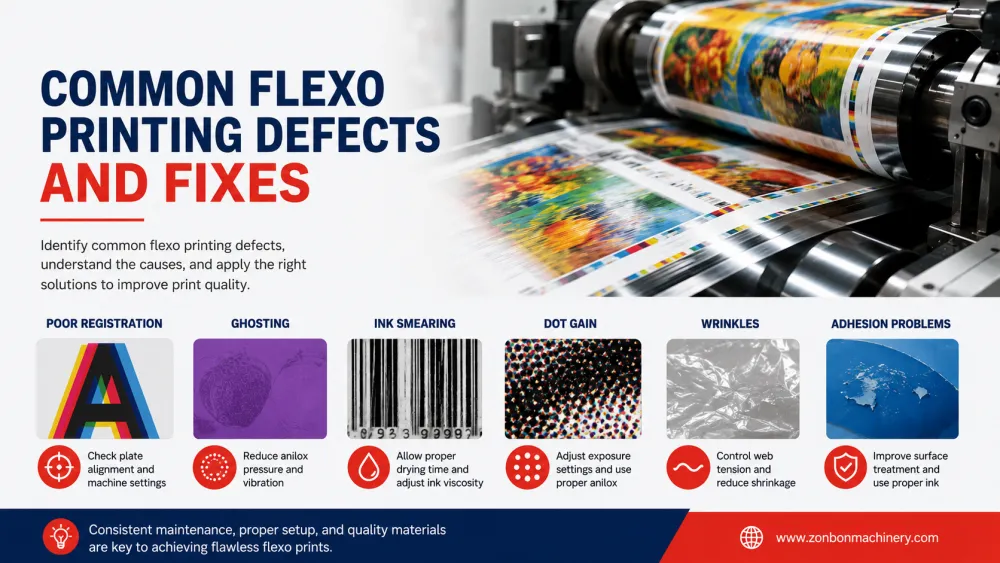
Poor registration is one of the most common flexographic printing defects, especially in multi-color packaging production.
Symptoms may include:
- Misaligned colors.
- Shadow effects around graphics.
- Blurry text or logos.
- Inconsistent repeat positioning.
Common Causes
- Unstable web tension.
- Film stretching during printing.
- Incorrect plate mounting.
- Mechanical vibration.
- Poor synchronization between printing stations.
How to Fix It
- Stabilize tension control settings.
- Check web guiding performance.
- Inspect plate mounting accuracy.
- Reduce excessive machine vibration.
- Calibrate registration systems regularly.
For flexible packaging films, machine structure plays an important role in registration consistency. Thin materials such as PE, BOPP, PET, and laminated films generally benefit from more stable web handling systems.
Ink Smudging or Smearing
Smudging happens when ink does not dry properly before rewinding or when excessive ink transfer occurs.
Symptoms may include:
- Blurred graphics.
- Dirty print appearance.
- Ink transfer to adjacent layers.
- Blocking during rewinding.
Common Causes
- Insufficient drying performance.
- Excessive ink volume.
- Incorrect viscosity settings.
- Incompatible substrate and ink combination.
How to Fix It
- Improve drying temperature and airflow.
- Adjust ink viscosity.
- Optimize anilox roller selection.
- Match ink system to substrate type.
Ghosting in Flexo Printing
Ghosting appears as unwanted repeated images or inconsistent ink density across printed graphics.
This defect often becomes more visible in solid areas or repeated graphic patterns.
Common Causes
- Insufficient ink transfer.
- Improper anilox volume.
- Plate design imbalance.
- Uneven printing pressure.
How to Fix It
- Adjust ink distribution settings.
- Select a more suitable anilox roller.
- Improve plate design balance.
- Optimize print pressure.
Dot Gain
Dot gain occurs when printed dots appear larger than intended, affecting graphic sharpness and color consistency.
Symptoms may include:
- Darkened graphics.
- Reduced image detail.
- Loss of highlight areas.
- Inconsistent color tone.
Common Causes
- Excessive impression pressure.
- Incorrect plate hardness.
- Improper ink transfer.
- Material absorbency issues.
How to Fix It
- Reduce printing pressure.
- Select suitable plate material.
- Adjust anilox specifications.
- Control ink density carefully.
Uneven Ink Transfer
Uneven ink transfer can create inconsistent color density across the substrate.
This problem often becomes more noticeable during long production runs.
Common Causes
- Dirty or damaged anilox rollers.
- Improper doctor blade settings.
- Ink viscosity inconsistency.
- Drying instability.
How to Fix It
- Clean anilox rollers regularly.
- Inspect doctor blade wear.
- Monitor ink viscosity during production.
- Stabilize drying performance.
Pinholing or Missing Print Areas
Pinholing appears as small unprinted spots or missing areas within graphics.
Common Causes
- Substrate contamination.
- Poor surface treatment.
- Ink adhesion problems.
- Incorrect printing pressure.
How to Fix It
- Check substrate cleanliness.
- Verify corona treatment performance.
- Improve ink-substrate compatibility.
- Optimize printing pressure.
Wrinkling or Web Movement
Wrinkling and unstable web movement are common issues when printing lightweight films.
Symptoms may include:
- Uneven print alignment.
- Registration shifting.
- Surface defects.
- Material deformation.
Common Causes
- Poor tension control.
- Improper roller alignment.
- Incorrect web guiding.
- Material thickness inconsistency.
How to Fix It
- Adjust web tension settings.
- Inspect roller alignment.
- Calibrate web guide systems.
- Use more stable substrate rolls.
Poor Ink Adhesion on Film Materials
Film materials such as PE, BOPP, PET, and laminated films may experience adhesion problems if ink and substrate compatibility are not properly managed.
Common Causes
- Low surface energy.
- Weak corona treatment.
- Incorrect ink type.
- Drying issues.
How to Fix It
- Check surface treatment level.
- Choose compatible ink systems.
- Improve drying performance.
- Test adhesion before mass production.
How Modern Flexo Printing Machines Help Reduce Printing Defects
Machine stability plays a major role in reducing flexographic printing defects.
Different substrate materials often benefit from different flexographic printing machine structures:
- CI Flexo Printing Machines are widely used for flexible packaging films requiring stable registration and tension control on thin materials such as PE, PET, BOPP, and laminated films.
- Stack Flexo Printing Machines are commonly used for kraft paper bags, woven bags, shopping bags, and thicker packaging materials.
- Gearless CI Flexo Printing Machines can improve registration precision and reduce setup waste for premium packaging and high-speed production.
- Inline Flexo Printing Press systems are often used for labels and narrow web applications requiring inline converting.
Modern features such as automatic tension control, servo synchronization, stable drying systems, and advanced registration control can significantly improve print consistency and reduce production waste.
How to Prevent Flexo Printing Problems Before Production
- Inspect substrate quality before printing.
- Calibrate registration and tension systems.
- Maintain anilox rollers and doctor blades.
- Test ink compatibility with materials.
- Verify drying performance.
- Train operators on proper setup procedures.
Preventive process control is often more cost-effective than troubleshooting problems after production defects occur.
FAQ About Flexo Printing Defects
What is the most common defect in flexographic printing?
Poor registration is one of the most common defects, especially in multi-color packaging production.
Why does flexo printing cause ghosting?
Ghosting usually happens because of uneven ink transfer, plate imbalance, or incorrect anilox selection.
How do you reduce flexo printing defects?
Stable tension control, proper ink management, accurate plate mounting, and machine maintenance help reduce defects.
Why does ink not stick to plastic film?
Poor ink adhesion may result from weak surface treatment, incompatible ink, or drying problems.
Can machine type affect printing defects?
Yes. Machine structure, tension stability, registration systems, and automation level can directly influence print consistency and defect reduction.