





How Ink Transfer Works in Rotogravure Printing
Ink transfer is one of the most important processes in rotogravure printing. It directly affects color density, image sharpness, print consistency, and overall packaging quality.
Even when a gravure printing machine runs at high speed, poor ink transfer can still lead to weak colors, missing details, smearing, or inconsistent print results.
For flexible packaging manufacturers, understanding how ink transfer works helps explain why gravure printing delivers premium graphics quality and what factors influence production stability.
What Is Ink Transfer in Rotogravure Printing?
Ink transfer refers to the process of moving ink from engraved cylinder cells onto the substrate surface during printing.
Unlike some other printing technologies, rotogravure printing stores ink inside microscopic engraved cells below the cylinder surface.
During production:
- Ink fills the engraved cells
- Excess ink is removed by the doctor blade
- The remaining ink transfers onto the substrate under pressure
Because the amount of transferred ink is highly controlled, rotogravure printing can maintain stable color consistency even during long production runs.
How Ink Transfer Works Step by Step
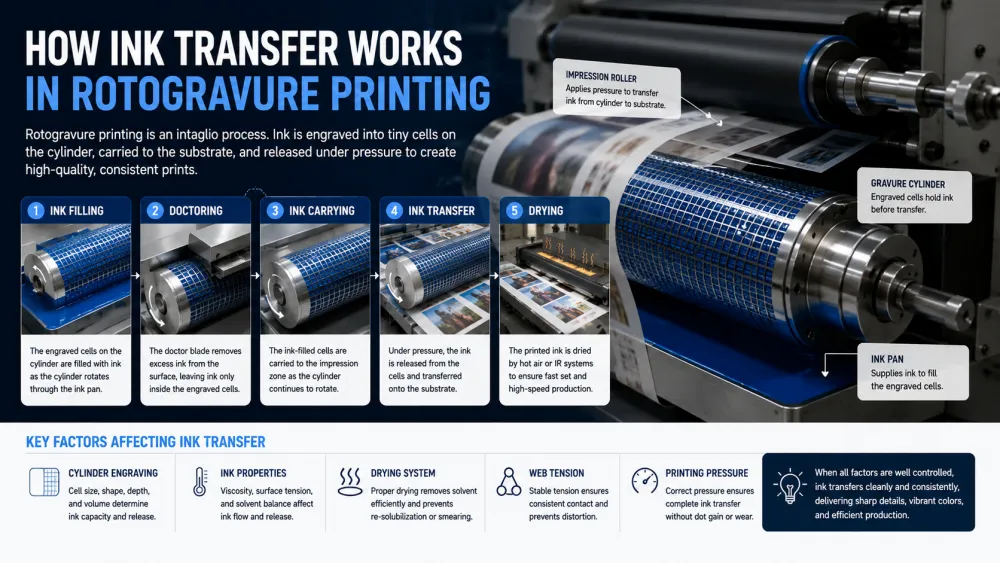
Ink transfer in gravure printing happens through a highly coordinated process between the cylinder, ink system, doctor blade, substrate, and pressure settings.
1. Cylinder Cells Pick Up Ink
The engraved gravure cylinder rotates through the ink pan, allowing microscopic cells to fill with ink.
The size and depth of these cells determine:
- Ink volume
- Color density
- Image sharpness
- Gradient smoothness
Cylinder design strongly influences print quality. You can learn more in our guide to Understanding Gravure Printing Cylinder Engraving .
2. Doctor Blade Removes Excess Ink
After ink pickup, a doctor blade scrapes excess ink from the cylinder surface.
Only ink trapped inside engraved cells remains for printing.
Stable doctor blade performance helps prevent:
- Streaks
- Uneven print density
- Dirty printing
- Ink contamination
Poor blade condition may reduce transfer quality and create visible defects.
3. Ink Transfers to the Substrate
As the cylinder contacts the substrate, impression pressure pushes ink from the engraved cells onto the material surface.
This stage determines:
- Print consistency
- Color strength
- Fine detail reproduction
- Overall image quality
Stable pressure and material handling are essential for consistent transfer efficiency.
4. Drying Stabilizes the Printed Image
After transfer, the substrate enters a drying section where solvent or moisture evaporates.
Proper drying helps:
- Prevent smearing
- Improve ink adhesion
- Maintain color consistency
- Support high-speed production
Poor drying can negatively affect transfer quality and create print instability. Learn more in How Drying Systems Affect Rotogravure Printing Efficiency .
What Factors Affect Ink Transfer in Rotogravure Printing?
Ink transfer efficiency depends on multiple production variables working together.
1. Cylinder Engraving Quality
Cell geometry plays a major role in how much ink transfers to the substrate.
Important factors include:
- Cell depth
- Cell shape
- Cell consistency
- Cylinder wear condition
Poor engraving may cause:
- Weak colors
- Missing dots
- Uneven graphics
2. Ink Viscosity
Ink viscosity strongly influences transfer performance.
Ink that is too thick may transfer poorly, while overly thin ink can create weak density or smearing problems.
Maintaining stable viscosity helps improve:
- Print clarity
- Color consistency
- Production repeatability
3. Impression Pressure
Correct pressure ensures efficient contact between the cylinder and substrate.
Too much pressure may distort materials, while insufficient pressure can reduce transfer efficiency.
4. Substrate Surface Properties
Different materials absorb or receive ink differently.
Common gravure printing materials include:
- BOPP film
- PET film
- PE film
- CPP film
- Aluminum foil laminates
Surface treatment and material structure affect adhesion and print consistency.
5. Web Tension Stability
Material movement directly affects print precision.
Unstable web tension may cause:
- Registration drift
- Uneven pressure
- Inconsistent transfer
Stable web handling improves print repeatability. Learn more in Tension Control Systems in Rotogravure Printing Machines .
Why Rotogravure Printing Delivers High Print Quality
One reason gravure printing remains dominant in flexible packaging is its highly controlled ink transfer system.
Compared with some other printing methods, gravure printing offers:
- Consistent color density
- Excellent gradient reproduction
- Strong fine-detail printing
- Stable long-run repeatability
This makes gravure particularly suitable for:
- Snack packaging
- Coffee packaging
- Pet food packaging
- Frozen food bags
- Premium flexible packaging
Common Ink Transfer Problems
Packaging manufacturers sometimes experience transfer-related defects during production.
| Problem | Possible Cause |
|---|---|
| Weak Print Density | Poor cylinder engraving or low viscosity |
| Ink Smearing | Insufficient drying |
| Uneven Color | Doctor blade or viscosity issue |
| Missing Dots | Cylinder wear or poor pressure |
| Registration Drift | Web tension instability |
You can explore practical troubleshooting methods in our guide to Common Gravure Printing Defects and Solutions .
How Modern Rotogravure Printing Machines Improve Ink Transfer
Modern Rotogravure Printing Machines increasingly combine advanced cylinder technology, servo synchronization, intelligent tension control, optimized drying systems, and automated registration to improve transfer consistency.
These technologies help manufacturers reduce waste, improve print quality, and maintain stable production at high speed.
Conclusion
Ink transfer is one of the most important processes in rotogravure printing because it directly affects print quality, color consistency, and production efficiency.
Stable transfer depends on multiple factors including cylinder engraving, doctor blade condition, viscosity, impression pressure, drying performance, and web tension.
Understanding how these systems work together helps packaging manufacturers improve print quality and make better production decisions.
FAQ: How Ink Transfer Works in Rotogravure Printing
How does ink transfer work in rotogravure printing?
Ink fills microscopic engraved cells on the gravure cylinder, excess ink is removed by a doctor blade, and the remaining ink transfers to the substrate under pressure during printing.
Why is ink transfer important in gravure printing?
Ink transfer directly affects color density, image sharpness, print consistency, and packaging appearance. Poor transfer may lead to weak colors, missing dots, or unstable print quality.
What affects ink transfer efficiency in gravure printing?
Important factors include cylinder engraving quality, doctor blade condition, ink viscosity, impression pressure, substrate properties, drying performance, and web tension stability.
Can poor cylinder engraving affect ink transfer?
Yes. Poor engraving quality may reduce ink transfer efficiency and create weak colors, uneven density, or missing print details.
How does drying affect ink transfer?
Drying stabilizes the printed image after transfer. Insufficient drying may cause smearing, poor adhesion, and inconsistent print quality.
Why does gravure printing produce consistent colors?
Gravure printing controls ink transfer through precisely engraved cylinder cells, allowing highly repeatable color performance during long production runs.
Which materials work best for gravure ink transfer?
Gravure printing works well on BOPP, PET, PE, CPP films, aluminum foil laminates, and other flexible packaging materials with suitable surface treatment.